Smart Cycle Discounts – WooCommerce Discount Campaigns, Dynamic Pricing & Scheduled Sales - Complete Description
Category: WordPress Plugins • Platform: PHP
Smart Cycle Discounts is a WooCommerce dynamic pricing and discount plugin for creating scheduled sale campaigns. Set up percentage discounts, fixed amount discounts, bulk discounts, tiered pricing, and BOGO offers with a 5-step campaign wizard.
Key capabilities:
- Schedule WooCommerce sales with specific start and end dates
- Apply discounts to all products, specific products, or random product selections
- Set campaign priorities when running multiple promotions
- Automatic activation and deactivation based on your schedule
Free Version Features
Campaign Wizard
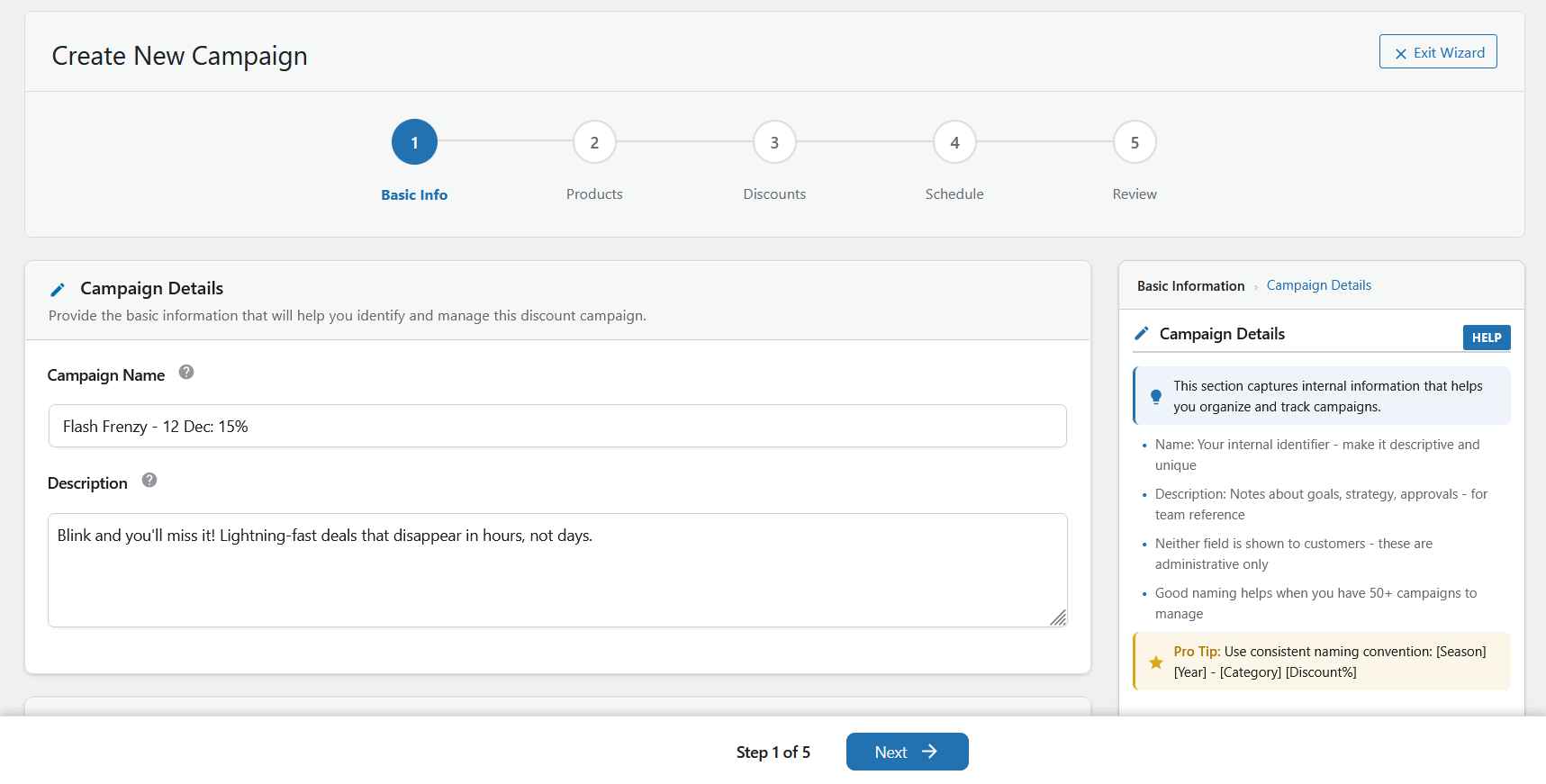
Create discount campaigns in minutes with a guided 5-step workflow:
- Basic Info – Name your campaign and set priority
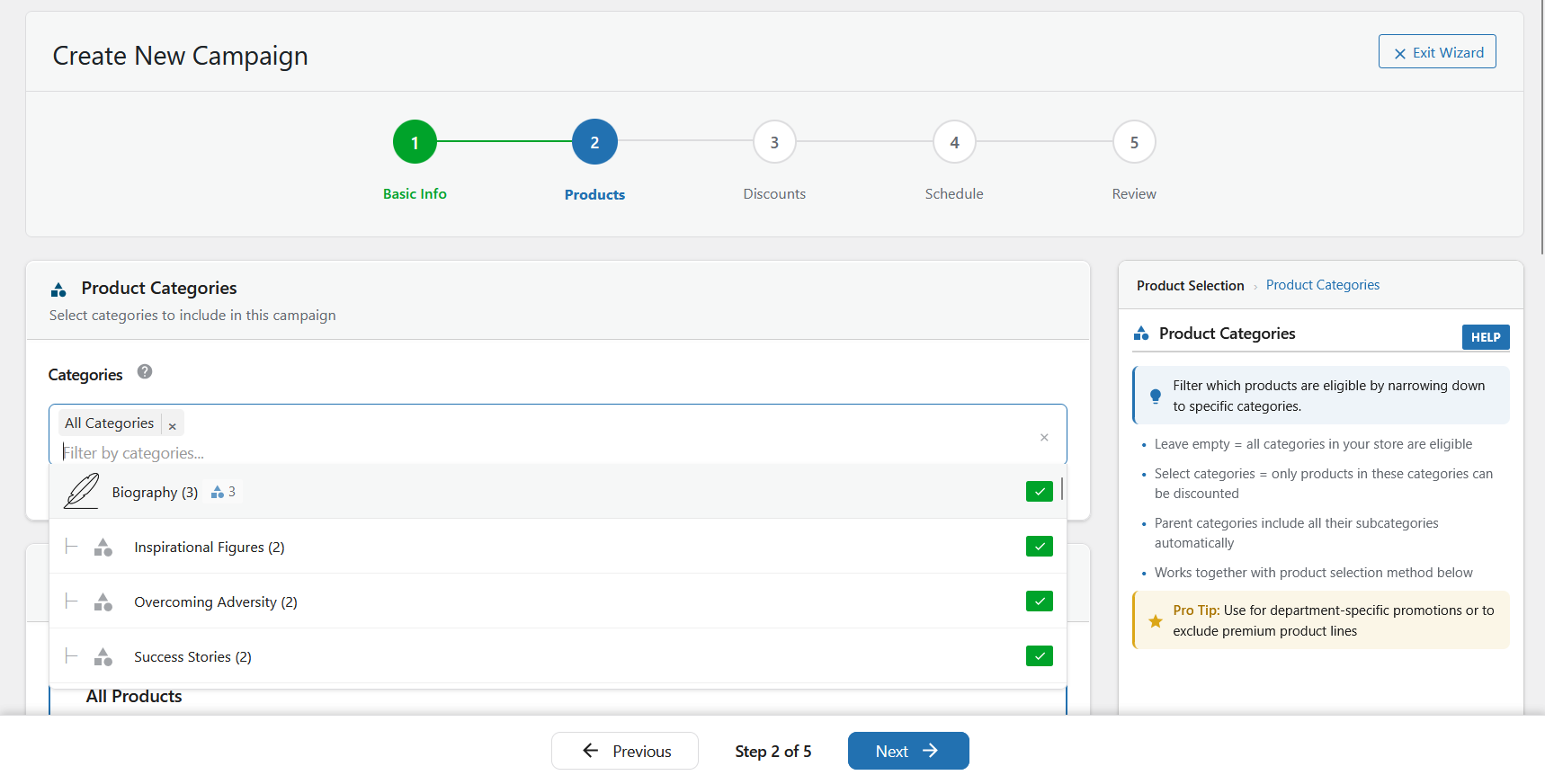
- Products – Select which products to discount
- Discounts – Choose discount type and amount
- Schedule – Set start and end dates
- Review – Verify settings and launch
Product Selection
- All Products – Apply discounts store-wide
- Specific Products – Search and select individual products by name, SKU, or ID
- Random Products – Automatically rotate discounts across random products
Discount Types
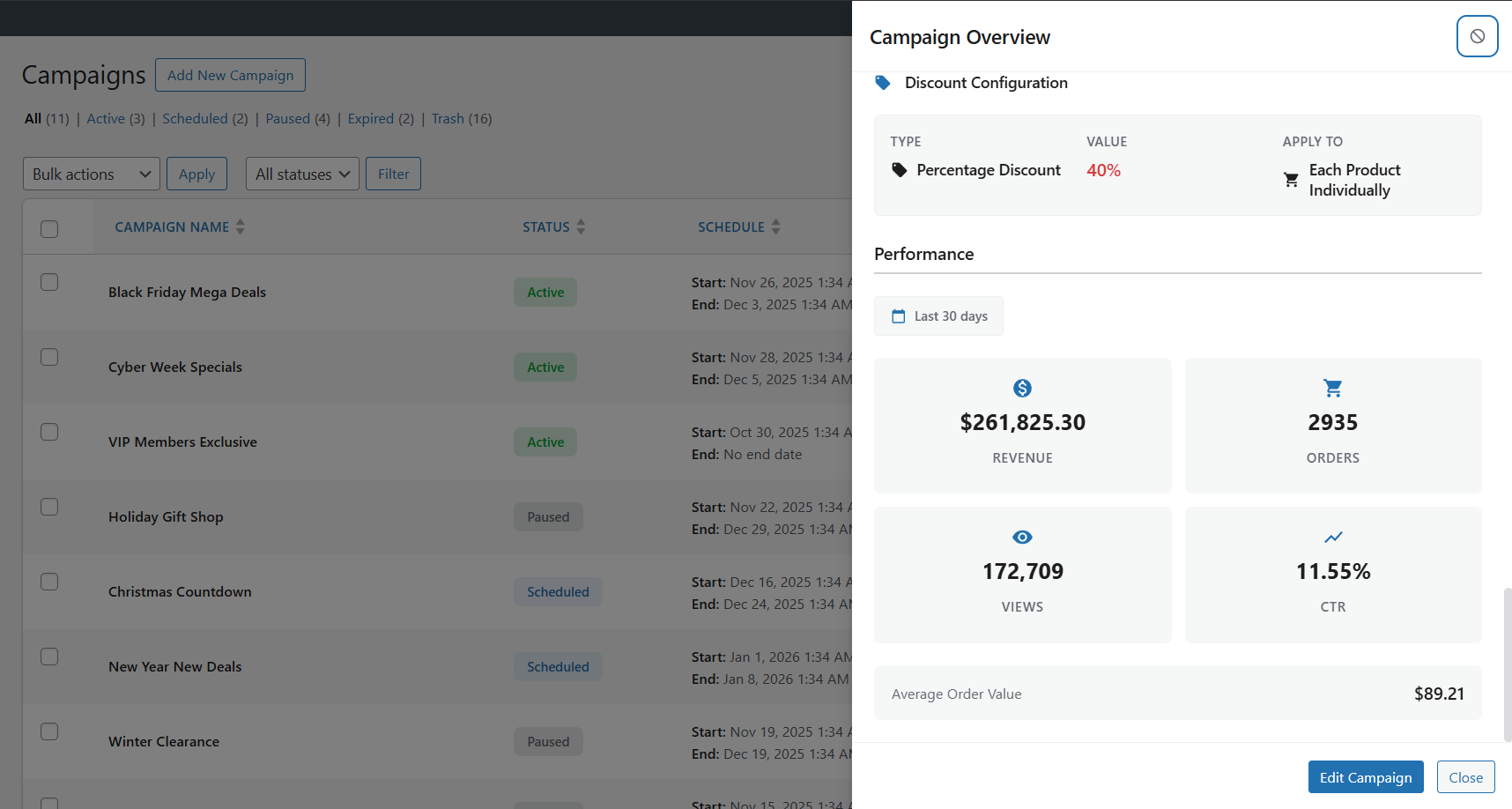
- Percentage Off – Reduce prices by a percentage (e.g., 25% off)
- Fixed Amount Off – Reduce prices by a fixed amount (e.g., $10 off)
Scheduling
- Date and Time Control – Set precise start and end times with timezone support
- Automatic Activation – Campaigns start and stop on schedule without manual intervention
- Draft Mode – Prepare campaigns in advance and activate when ready
Campaign Management
- Unlimited Campaigns – No restrictions on how many campaigns you can create
- Priority System – Control which discount applies when campaigns overlap (1-5 levels)
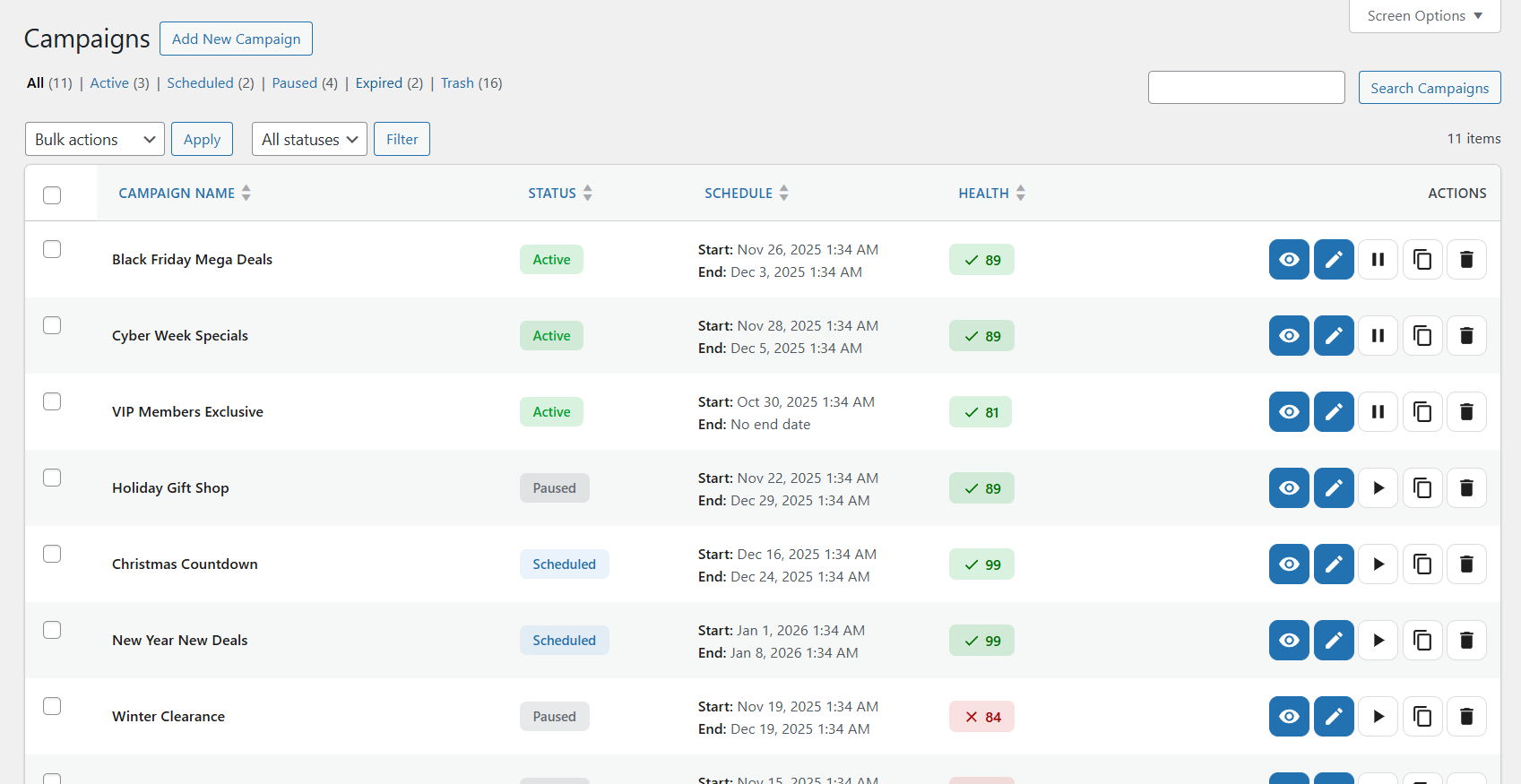
- Bulk Actions – Activate, deactivate, duplicate, or delete multiple campaigns at once
- Health Monitoring – Real-time validation alerts you to potential issues
Technical
- WooCommerce HPOS Compatible – Works with High-Performance Order Storage
- Performance Optimized – Efficient queries and caching for large catalogs
- Secure – Follows WordPress security best practices
Pro Version
Upgrade to Smart Cycle Discounts Pro for advanced discount types, analytics, and automation.
Additional Discount Types
- Tiered Pricing – Quantity-based discounts (e.g., Buy 5+ get 10% off, Buy 10+ get 20% off)
- Buy One Get One – Flexible BOGO offers with configurable quantities and discount percentages
- Spend Threshold – Cart total discounts (e.g., Spend $100 get 15% off entire order)
Advanced Controls
- Usage Limits – Set per-customer limits, total redemption caps, and lifetime thresholds
- Application Rules – Apply discounts to all items, cheapest item only, most expensive, or first X items
- Smart Product Selection – Auto-select Best Sellers, Featured Products, Low Stock, or New Arrivals
Analytics
- Performance Dashboard – Track revenue, conversions, and campaign effectiveness
- Date Range Filtering – Analyze any time period
- Export Reports – Download CSV or JSON data for external analysis
Notifications
- Campaign Alerts – Get notified when campaigns start, end, or need attention
- Performance Warnings – Automatic alerts for underperforming campaigns
- Scheduled Reports – Daily or weekly email summaries
Developer Features
- REST API – Programmatic campaign management for custom integrations
- Priority Support – Dedicated support queue for faster response
Common Use Cases
- Seasonal Promotions – Schedule Black Friday, Christmas, or Summer sales weeks in advance
- Flash Sales – Run time-limited discounts that start and end automatically
- Daily Deals – Rotate discounts across different products each day
- Clearance Events – Apply bulk discounts to hundreds of products at once
- Overlapping Campaigns – Run multiple promotions simultaneously with priority control
For Developers
- Hooks and Filters – Extend functionality with actions and filters throughout
- Documented Code – PHPDoc blocks and inline comments
- REST API – Programmatic access to campaigns (Pro)
Getting Started
Quick Start
- Go to Campaigns > Create Campaign in your WordPress admin
- Follow the 5-step wizard: Basic Info Products Discounts Schedule Review
- Click Create Campaign to launch your discount
Example: 25% Off Flash Sale
- Basic Info: Name it “Flash Sale” with priority 5
- Products: Select “All Products” or pick specific items
- Discounts: Choose “Percentage” and enter 25
- Schedule: Set start date/time and end date/time
- Review: Verify settings and click Create
Your discounts will activate and deactivate automatically on schedule.
Managing Campaigns
Access Campaigns in your admin menu to view, edit, duplicate, or delete campaigns. Use bulk actions to manage multiple campaigns at once.
Need Help?
External services
This plugin connects to external services for licensing, updates, and optional email delivery. Below is a complete list of all external services used, including the specific domains contacted.
Freemius (License Management)
This plugin uses Freemius for license management, plugin updates, and optional usage analytics.
- Service provider: Freemius, Inc.
- Domains contacted: api.freemius.com, wp.freemius.com, checkout.freemius.com, users.freemius.com
- What it does: Handles Pro license activation/deactivation, delivers plugin updates, processes payments via secure checkout, and collects anonymous usage data (if opted-in)
- When data is sent: On plugin activation, license validation, update checks, Pro checkout, and if you opt-in to usage tracking
- What data is sent: Site URL, plugin version, license key (if Pro), WordPress version, PHP version, and anonymous usage statistics (only if opted-in)
- Terms of Service: https://freemius.com/terms/
- Privacy Policy: https://freemius.com/privacy/
Plugin Feedback API (Optional)
When deactivating the plugin, you may optionally provide feedback to help us improve.
- Service provider: Webstepper
- Domain contacted: api.smartcyclediscounts.com
- What it does: Collects optional deactivation feedback to improve the plugin
- When data is sent: Only when you choose to submit the optional deactivation feedback form during plugin deactivation
- What data is sent: Feedback reason, site URL, WordPress version, WooCommerce version, PHP version, plugin version, and basic usage statistics (number of campaigns created)
- Terms of Service: https://webstepper.io/terms-of-service/
- Privacy Policy: https://webstepper.io/privacy-policy/
SendGrid Email API (Optional)
This plugin can optionally connect to the SendGrid API to send email notifications about your discount campaigns.
- Service provider: Twilio SendGrid
- Domain contacted: api.sendgrid.com
- What it does: Delivers email notifications (campaign started, campaign ended, performance alerts)
- When data is sent: Only when you configure SendGrid as your email provider in Settings > Email Notifications AND an email notification is triggered by campaign events
- What data is sent: Recipient email address, email subject, and email body content (campaign status information only – no customer personal data is transmitted)
- Terms of Service: https://www.twilio.com/legal/tos
- Privacy Policy: https://www.twilio.com/legal/privacy
Amazon SES Email API (Optional)
This plugin can optionally connect to Amazon Simple Email Service (SES) to send email notifications about your discount campaigns.
- Service provider: Amazon Web Services
- Domain contacted: email.[region].amazonaws.com (where [region] is your configured AWS region, e.g., email.us-east-1.amazonaws.com)
- What it does: Delivers email notifications (campaign started, campaign ended, performance alerts)
- When data is sent: Only when you configure Amazon SES as your email provider in Settings > Email Notifications AND an email notification is triggered by campaign events
- What data is sent: Recipient email address, email subject, and email body content (campaign status information only – no customer personal data is transmitted)
- Terms of Service: https://aws.amazon.com/service-terms/
- Privacy Policy: https://aws.amazon.com/privacy/
Important: All external services except Freemius (required for licensing) are completely optional. The plugin works fully without configuring SendGrid or Amazon SES. The Plugin Feedback API is only contacted if you explicitly choose to submit feedback during deactivation. No email data is transmitted unless you explicitly enable and configure email integrations in Settings > Email Notifications.
Additional Information
Support
Privacy
Campaign data is stored locally in your WordPress database. The plugin does not collect or transmit customer personal data. See the “External services” section for details about third-party integrations.