Bros Clean Admin – Hide Dashboard Ads - Complete Description
Category: WordPress Plugins • Platform: PHP
Many plugins flood your wp-admin with:
- “Go Pro / Upgrade” boxes
- Black Friday / Cyber Monday sales
- “Please rate us 5-stars” notices
Bros Clean Admin – Hide Dashboard Ads quietly removes that noise so you can focus on your work.
What it does:
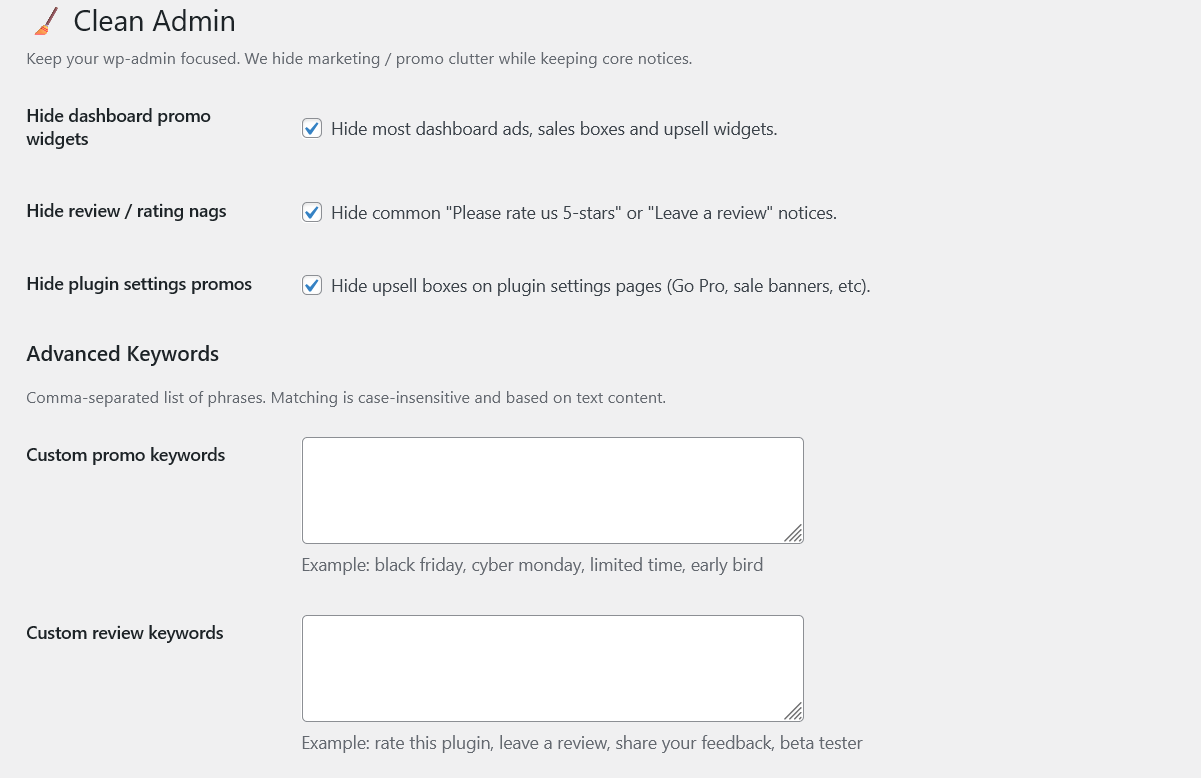
- Hides most dashboard promo widgets and sale banners
- Hides annoying “Rate us / Leave a review” nags
- Hides common plugin promo boxes on settings pages
- Keeps core error/warning notices visible
- Simple options page under Settings Clean Admin
- Supports translations via
bros-clean-admin-hide-dashboard-adstext domain - Custom promo/review keyword lists for power users
- Settings reset to defaults with one click
- Shows a quick activation notice with direct Settings link
This plugin only runs in wp-admin and does not affect your frontend.
If you enjoy this plugin and want to support development, you can buy me a coffee here:
https://ko-fi.com/W7W51P4XY6
Development and source code:
- Author profile: https://github.com/EneaCodes/
- Plugin repository: https://github.com/EneaCodes/clean-admin
Advanced Usage
Custom Keywords
You can add your own keywords to hide specific promotions or review requests. For example:
- To hide “Early Bird” offers: add
early birdto Custom Promo Keywords. - To hide “Beta Tester” requests: add
beta testerto Custom Review Keywords.
Each field accepts a comma-separated list of phrases. Matching is done in a simple “contains text” way, case-insensitive.
Hooks for Developers
You can filter the default keyword lists using these filters:
brosclad_promo_words– filter the default promo words array.brosclad_review_words– filter the default review words array.
Example:
add_filter( 'brosclad_promo_words', function( $words ) { $words[] = 'early bird'; return $words; } );