WP Map Block – Gutenberg Map Block for Google Map and OpenStreet Map by aBlocks - Complete Description
Category: Development • Platform: WordPress Plugins
Important Announcement: The WP Map Block plugin has officially merged with aBlocks. It’s an innovative and comprehensive Gutenberg blocks builder for WordPress. Now, you can enjoy enhanced mapping options alongside a wide range of customizable blocks. All within a single, powerful plugin aBlocks. Here’s how to Migrate WP Map Block to aBlocks!
Why Switch to aBlocks?
As a valued WP Map Block user, you’ll benefit from this upgrade in several ways:
Enhanced Mapping Features: Experience all the functionalities you loved in WP Map Block. The interactive maps with Google Maps and OpenStreetMap are now integrated into the powerful aBlocks framework.
More Customization Options: With aBlocks, you have the access to an extensive library of blocks that allow you to create stunning layouts and designs beyond just maps. You can create a complete website with advanced customization options.
User-Friendly Interface: The intuitive Gutenberg editor in aBlocks makes it easier than ever to add and customize maps and other blocks without any coding knowledge.
Responsive Design: Ensure your maps and content look great on any device with built-in responsive settings.
Key Features of aBlocks:
Customizable Blocks: Explore various blocks designed for different content types, including container, headings, text & color customization and even more.
Interactive Maps: Easily embed Google Maps or OpenStreetMap with customizable options and animations that enhance user engagement.
Performance Optimized: Enjoy fast load times and smooth operation with aBlocks lightweight design.
Transferring from WP Map Block to aBlocks
If you were using WP Map Block, you can transfer to aBlocks uninterrupted. Simply install the aBlocks plugin from the WordPress directory. You’ll see a button “Convert to Map Block” in the section where you used the WP Map Block. Simply click it and all your existing map configurations will be automatically transferred. You’ll retain your map settings while gaining access to new and advanced customization options.
You can use the map block the same way you’ve used it before for Google Maps and OpenStreetMap.
The new Map Block offers a simple user interface that allows you to add Google Maps and OpenStreetMap to your WordPress site. This plugin is built with LeafletJS, an open-source JavaScript library for mobile-friendly interactive maps. This straightforward Map option for your website with advanced settings of aBlocks.
It is the ideal solution for you if you’re using the Gutenberg editor and require a map on your site. Using aBlocks, you can easily customize Google Maps or OpenStreetMap for Gutenberg-supported posts, pages, or custom post types for your WordPress site.
Most Convenient Way to utilize Gutenberg Map block for Google Maps & OpenStreet Maps.
WP Map Block offers a simple user interface that allows you to add Google Maps to your WordPress site. This amazing plugin is built with LeafletJS, an open-source JavaScript library for mobile-friendly interactive maps. There are no fluff and redundant settings and a straightforward Map option for your Gutenberg block.
WP Map Block is the ideal solution for you if you’re using the Gutenberg editor and require a map on your site. Using this plugin, you can easily customize Google Maps or OpenStreetMap for Gutenberg-supported posts, pages, or custom post types for your WordPress site.
Plugin Features ✅
- Google Maps
- OpenStreet Maps
- Multiple Marker
- Zoom Control
- Full Screen Map Control
- Custom Marker Icon & Popup
- Map Width & Height
- Latitude and Longitude Generator from address
- Set any marker as center position
- Marker Builder
- Draggable Marker
- Don’t need any API key
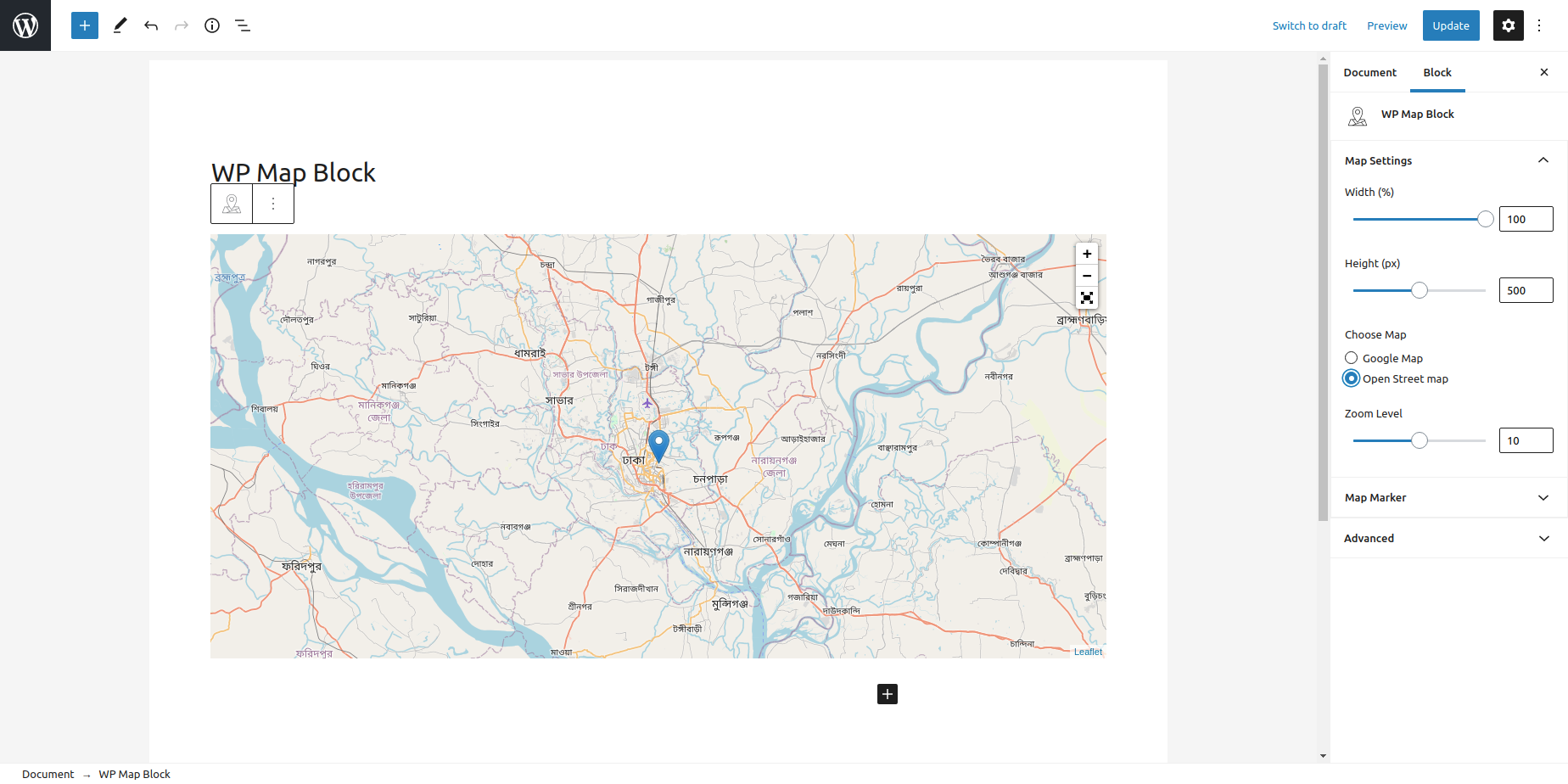
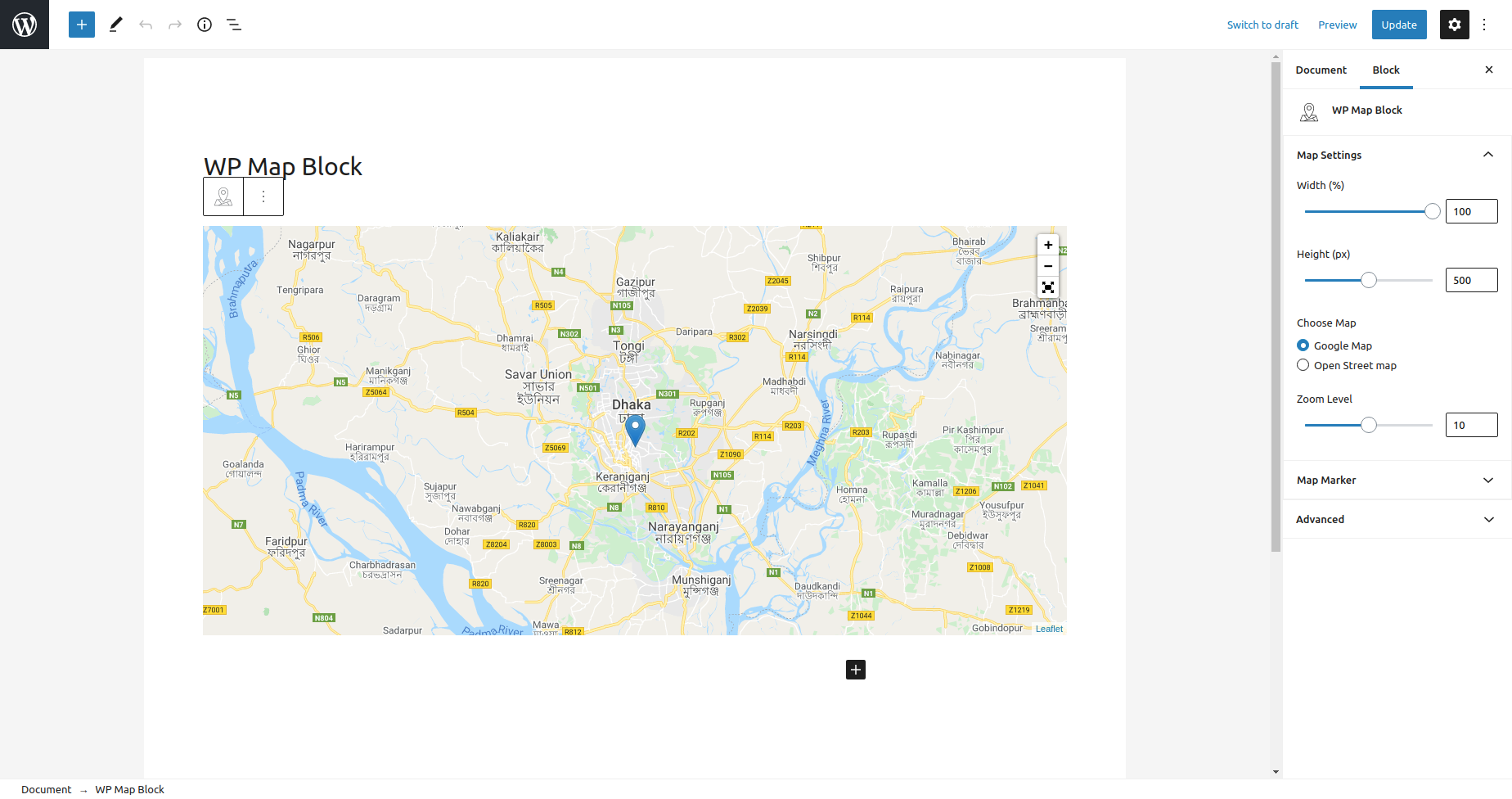
🗺️Google Map: Set the default Google Map on any page or post of your WordPress site. With a single click, you can select this map anywhere on your site using WP Map Block.
🛣️OpenStreet Maps: We’ve included this option for you so you can enable OpenStreet Maps and tweak it within your site. OpenStreet Map is an open-source map where you can contribute to improving the quality of data on the map. Every update you make to Open Street Map is owned by both you and the community as a whole.
📌Multiple Marker: By default, a marker will appear on the map based on your location. But you can add additional markers on your map by customizing the settings. Also, set the title and content for the marker as well as set the default position of the marker.
🔎 Zoom Control: Zoom in and out of the map with ease using the zoom option. The map works quickly since it is built using LeafletJS, and it does not take long to load the map after zooming in or out.
📲Full-Screen Map Control: Get a full-screen map view while using the map presented by this plugin. You can control the map very comfortably within the full screen and navigate the whole map freely.
🛠️ Custom Marker Icon & Popup: Explore the settings and customize the marker on your map. You can place custom markers on the map and also place your preferred popups on the map.
🎚️Map Width & Height: You can set your preferred width and height on the map by customizing it from the settings. This option allows you to set the displayed map at a certain height and width and then place it on the front end of your site. You can set it according to your viewing preference.
☸️ Latitude and Longitude Generator: You can generate addresses from the latitude and longitude of your location. With the help of latitude and longitude, you will get a precise location and address on the map.
📍Set any marker as the center position: You can set the marker in the central position on the map. If you have placed a custom marker on the map, you can set it as your default marker and set its position in the middle. This will show the marker as the main marker; it will be displayed at the center of the map.
☄️Marker Builder: You may be bored to see the same old marker icon on the map. WP Map Block allows you to customize the map beyond the traditional elements of the map. You can customize as well as build a new marker and place it on the map.
👋 Draggable Marker: Drag the marker in any position on the map and reveal the location swiftly. The dragging option is really smooth, and after dragging the marker, the location gets revealed instantly.
🔑 API key not required: To place the map on your site. Simply select the map block and place it on any page of your site. The vast majority of Google Map plugins now available on the market need the use of API keys in order to activate the map; however, our plugin does not.
🔥 WHAT’S NEXT
If you like WP-Map-Block, then consider checking out our other WordPress Plugins for FREE:
🔝 Academy LMS – Academy LMS is a modern, lightweight LMS plugin for WordPress. It helps users create and sell online courses, manage instructors, track student progress, quizzes, and more — all inside WordPress.
🔝 aBlocks – aBlocks is a powerful Gutenberg-based WordPress website builder and a clean alternative to Elementor. It provides custom blocks and design flexibility while keeping your website fast and bloat-free.
🔝 StoreEngine – StoreEngine is an all-in-one, next-gen eCommerce plugin for WordPress. It’s designed to make selling digital products, courses, memberships, and even physical goods easier than ever.
💙 Join the aBlocks Community
Don’t miss out on the opportunity to elevate your WordPress site with aBlocks. Experience enhanced mapping capabilities along with a suite of powerful design tools. Install aBlocks today and unlock the full potential of your website!
- Like on our aBlocks Website
- Join our aBlocks Facebook Page
- Join our aBlocks Community Group