Grids: Layout builder for WordPress - Complete Description
Category: Development • Platform: WordPress Plugins
👉 For more information about the plugin, visit the documentation website.
A layout builder is a tool that helps you creating visual structures in your page, from a simple layout made by adjacent columns, to more complex compositions. Grids is entirely based on the WordPress block editor, which means that you’ll be able to use it together with the myriad of content blocks that developers and designers from all around the World are creating.
With Grids, we’re bringing a visual structure to the content written with the WordPress Block Editor.
👉 Sections & areas
A Section is a portion of the page that aims at being visually distinct from the rest of the content. Sections are usually top-level blocks that you add one after the other; the sequence of sections is what makes your page layout.
Each Section that you create is composed by several different Areas. In their most basic form, you can think of Areas as columns, which are nothing else than containers for content blocks.
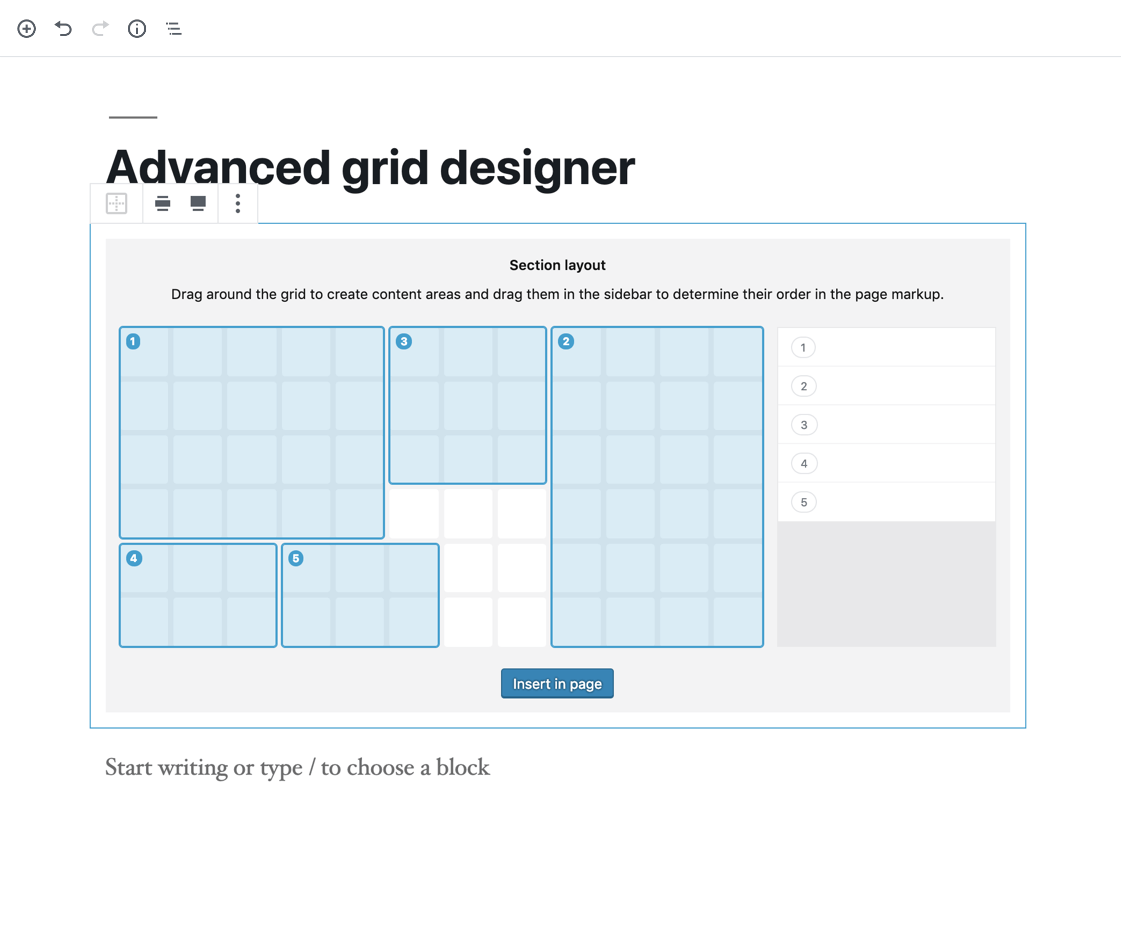
For more elaborated compositions, the Grid Designer allows you to create exactly the grid structure you want within the boundaries of a Section, by using CSS Grid.
👉 Want to know more? Read the plugin documentation! 👉 https://justevolve.it/grids/documentation/
👉 Still struggling? That may depend on one of the known issues 👉 https://justevolve.it/grids/documentation/known-issues/
👉 1.3.11
- FIX: Message regarding translations being loaded too early
- FIX: Styles and scripts correctly load in the editor iframe
- FIX: Compatibility with WordPress 6.9
👉 1.3.10
- FIX: Compatibility issues with WordPress 6.4
👉 1.3.9
- FIX: Security fix.
👉 1.3.8
- FIX: Fixed display settings functionality for sections and areas.
👉 1.3.7
- FIX: Fixed a fallback variable issue for Sections and Areas background.
👉 1.3.6
- FIX: Fixed an issue with the margins, paddings association on different media queries.
- FIX: Fixed background repeat and position default behavior on frontend.
👉 1.3.4 & 1.3.5
- FIX: Synced row dimension logic on frontend/backend: empty rows will collapse also on the Block Editor screen.
👉 1.3.3
- FIX: Fixed 500 error that occurred when using wide-aligned sections.
👉 1.3.2
- FIX: Changed the grid column declaration to minmax(0,1fr) in order to prevent grid blowout.
- FIX: Fixed nested sections issues.
👉 1.3.1
- FIX: Reverted row dimension logic: in Sections created with the advanced editor, empty rows will collapse.
👉 1.3.0
- ENHANCEMENT: Added compatibility with the Full Site Editor.
- ENHANCEMENT: Enhanced compatibility with single page application websites.
- FIX: Fixed style being applied to nested sections.
- Updated compatibility to WordPress 5.9.
POSSIBLY BREAKING CHANGES:
- In this version, we have removed the global page setting that allowed for the editor area to be wider when editing a page with the Block Editor. We feel that this should be better handled by the theme itself, especially if it supports the Full Site Editing mode.
- We have also removed the global page setting that determined the horizontal gutter between areas. This is now handled individually by Section blocks (look for Gap settings). As before, both horizontal and vertical gaps are subject to media queries.
- We have removed the
grids-s-$section_idandgrids-a-$area_idclasses from their respective elements, since they were no longer needed to generate the element’s style. If you need to specifically identify a section or area, you can use their custom class/anchor controls provided by the Block Editor.
👉 1.2.28
- ENHANCEMENT: Added the ability to specify the types of blocks allowed in content areas of a section through the grids/area filter.
- ENHANCEMENT: Added the ability to specify the size units used in Grids, as well as the default size unit suggested by the editor, through the grids/general filter.
- FIX: Removed unwanted log to console.
- Updated compatibility to WordPress 5.7.
👉 1.2.27
- FIX: Fixed an issue that occurred when editing custom-created sections and affected previously created areas.
- FIX: Fixed an issue that prevented post meta to be saved when using Grids with a Custom Post Type.
👉 1.2.26
- FIX: Added compatibility with WordPress 5.6 and the latest version of the Gutenberg plugin.
👉 1.2.25
- FIX: Minor backend UI fix.
- FIX: Fixed the dimensioning of blocks in content areas on frontend.
👉 1.2.24
- Enhanced support for AJAX-powered content pages.
👉 1.2.23
- FIX: Fixed React warnings and errors that occurred when the SCRIPT_DEBUG constant was set to true.
- FIX: Fixed section styling when in preview mode.
- FIX: Removed double scrollbar when dragging areas.
👉 1.2.22
- FIX: Increased compatibility with WordPress 5.4.
👉 1.2.21
- FIX: Fixed a bug that caused section IDs not to be rendered in the page markup.
👉 1.2.20
- FIX: Fixed compatibility with Gutenberg 7.3.
👉 1.2.19
- FIX: Fixed blocks toolbar issue.
👉 1.2.18
- FIX: Fixed reusable block functionality on Sections.
- FIX: Various minor UI tweaks.
- FIX: Minor bugs.
👉 1.2.17
- FIX: Fixed compatibility with Gutenberg 7.2.
- FIX: Minor UI tweaks.
👉 1.2.16
- FIX: Fixed grid display issues on Internet Explorer 11. Thanks to @amddtim for providing the fixes.
👉 1.2.15
- Improved the visualization of units in spacing controls.
- Added an option to expand the editor width.
👉 1.2.14
- FIX: Fixed compatibility with WordPress 5.3.
👉 1.2.13
- FIX: Fixed a z-index issue for the area selection highlight.
- FIX: Fixed an issue that prevented the correct display of duplicated sections.
👉 1.2.12
- FIX: Improved the editing of blocks in two vertical adjacent areas in an advanced grid.
- FIX: Fixed an area width display issue in the block preview.
👉 1.2.11
- Added visual feedback to elements when using dimension controls.
- FIX: Fixed a regression that prevented the correct use of vertical align in Areas.
👉 1.2.10
- FIX: Fixed a bug that prevented Sections to be saved correctly when they have an anchor specified.
- FIX: Minor UI tweaks.
👉 1.2.9
- Added anchor support to Sections: you can now add IDs to Section elements on frontend.
- Various UI tweaks to highlight the grid structure and rendering.
- Removed the Section block from the Grids section, and made available in the Layout blocks section.
- Changed the Section and Area block icons to match the plugin brand.
- FIX: First block selection after inserting a Section in page.
- FIX: Minor bugs.
👉 1.2.8
- FIX: Style alignment for areas when duplicating sections in the Block Editor.
👉 1.2.7
- FIX: Restore block insertion mode for newly created areas when using the Gutenberg plugin.
- FIX: Compatibility fixes with Gutenberg 5.9.0.
👉 1.2.6
- FIX: Behavior of content areas when adding lateral spacing.
👉 1.2.5
- Added a new “Stretch” option for backgrounds on sections with “wide” alignment.
- FIX: Minor bugs.
👉 1.2.4
- Submitted Grids to the Blocks directory on WordPress.org.
- Include JS and SCSS source files.
👉 1.2.3
- FIX: Fixed an issue that prevented to properly visualize the Block Inserter when the
z-indexof an area had been tweaked. - FIX: Fixed an issue that could cause multiple areas to be added to a section, without using the Grid Designer component.
- FIX: Minor bug fixes.
👉 1.2.2
- FIX: Fixed an issue that prevented custom accent colors to work as intended on the Twenty Nineteen default theme.
👉 1.2.1
- FIX: Minor visual tweaks.
- FIX: Editing of sections composed with the Grid Designer.
👉 1.2
- NEW FEATURE: Added page-wide gutter control.
- ENHANCEMENT: Grid Designer is now available when editing a section, and areas can be rearranged.
- FIX: CSS style for grids not displaying in loops.
- FIX: Sections can now be used as reusable blocks.
- FIX: Minor bugs.
👉 1.1.1
- FIX: Translation support.
- FIX: Issue with blocks toolbar.
👉 1.1.0
- NEW FEATURE: Grid Designer.
- FIX: Translation support.
- FIX: Minor bugs.
👉 1.0.0
- Initial public release.


