ChatGPT Access Token Web - Complete Description
Category: Development • Platform: Web
ChatGPT-AccessToken-Web (pandora没了,TIME TO SAY GOODBYE !!)
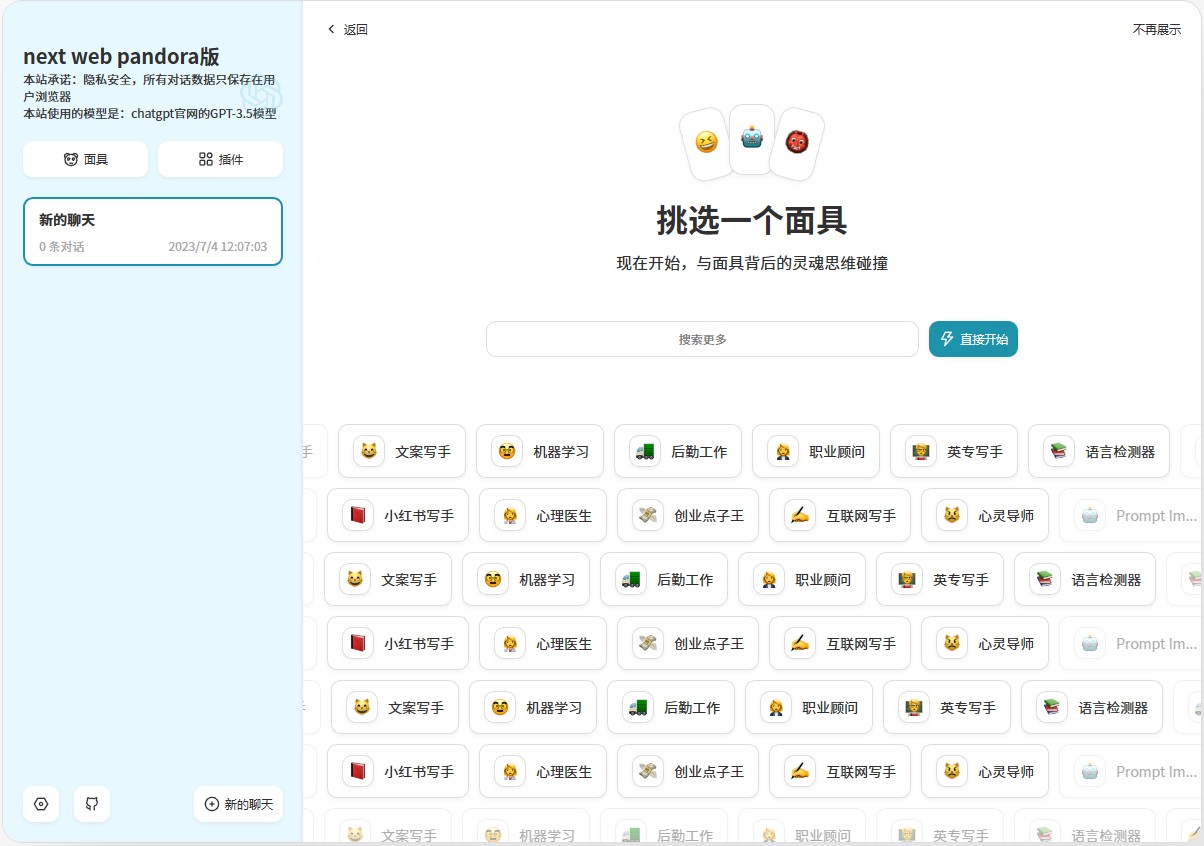
本项目基于使用Access Token的方式实现了网页版 ChatGPT的前端,不需要openai的api额度,是用 ChatGPT-Next-Web项目进行修改而得,默认Main分支对接gpt3.5的模型,gpt4分支对接gpt4模型。另外本项目需要的后端服务是 pandoranext项目, 项目是站在ChatGPT-Next-Web和pandoranext项目的作者肩膀上,感谢他们!
示例网站
主要功能

- 不需要openai的api额度,解决了api体验额度(1分钟只能调用3次api)用完后,频繁买号更改apikey,的痛点,成本更低
- 完整的 Markdown 支持:LaTex 公式、Mermaid 流程图、代码高亮等等
- 精心设计的 UI,响应式设计,支持深色模式,支持 PWA
- 极快的首屏加载速度(~100kb),支持流式响应
- 隐私安全,所有数据保存在用户浏览器本地
- 预制角色功能(面具),方便地创建、分享和调试你的个性化对话
- 海量的内置 prompt 列表
- 多国语言支持
下一步计划
- 无
Access Token
关于GPT Plus
- 本项目有个gpt4分支,但后续该分支不会更新
账号,密码
- 只支持chatgpt官方账号,不支持Google,Microsoft,apple第三方登录
- 也可以访问 这里验证账号密码。期间访问不需要梯子。这意味着你在手机上也可随意使用。
部署机器说明
- 在本地或者国内服务器都可以部署,不需要海外服务器。提供的docker镜像,是基于默认的Main分支(gpt3.5模型)
部署一(利用账号和密码部署)
-
确保有chatgpt官方账号
-
确保安装了docker,启动了docker
-
先获取License Id, 在这里拿License Id

-
把项目的pandoranext-deploy.zip放在服务器上,然后解压,cd pandoranext-deploy
-
在./data/config.json中把license_id的值设置为获取的License Id ,其他字段的值不要改动!!
-
在./data/tokens.json中把token的值修改为获取到的access_token ,其他字段的值不要改动!!
-
确保安装了docker,启动了docker
-
docker network create my-net
-
docker pull pengzhile/pandora-next
-
(这里容器的名字一定要是PandoraNext,不要改) docker run -d --restart always --name PandoraNext --net=my-net -v ./data:/data -v ./sessions:/root/.cache/PandoraNext pengzhile/pandora-next
-
如果是windows系统上用dockers,那要把./data 和 ./sessions 改成绝对路径
-
docker pull xueandyue/next-web-pandora:latest
-
CODE是设置的访问密码,如果CODE=""则表示不设置密码,如果CODE="123456",则设置密码为123456
-
docker run --network my-net -e username="你的gpt账号" -e password="你的gpt账号密码" -e CODE="123456" -p 3000:3000 -d xueandyue/next-web-pandora:latest
-
等待5分钟左右,在浏览器访问http://服务器域名(ip):3000/
-
大约要每隔10天重启3000端口的容器即可
备用部署一(利用access_token)
- 先获取Jwt的url, 在这里拿Jwturl

- 确保安装了docker,启动了docker
- docker pull xueandyue/next-web-pandora:accessToken
- docker run -e ACCESS_TOKEN="你的access_token" -e CODE="要设置的访问密码" -e Jwturl="你的Jwturl" -p 3000:3000 -d xueandyue/next-web-pandora:accessToken
- 如果CODE=""则表示不设置密码
- 在浏览器访问http://服务器域名(ip):3000/
- 等待5分钟左右,在浏览器访问http://服务器域名(ip):3000/
- 大约要每隔10天重新获取accessToken,重建创建3000端口的容器
备用部署二(利用access_token,支持多系统架构)
- 先获取License Id, 在这里拿License Id
- 把项目的pandoranext-deploy.zip放在服务器上,然后解压,cd pandoranext-deploy
- 在./data/config.json中把license_id的值设置为获取的License Id ,其他字段的值不要改动!!
- 在./data/tokens.json中把token的值修改为获取到的access_token ,其他字段的值不要改动!!
- 确保安装了docker,启动了docker
- docker network create my-net
- docker pull pengzhile/pandora-next
- (这里容器的名字一定要是PandoraNext,不要改) docker run -d --restart always --name PandoraNext --net=my-net -v ./data:/data -v ./sessions:/root/.cache/PandoraNext pengzhile/pandora-next
- 如果是windows系统上用dockers,那要把./data 和 ./sessions 改成绝对路径
- docker pull xueandyue/next-web-pandora:accessToken2
- docker run --network my-net -e ACCESS_TOKEN="你的access_toke" -e CODE="要设置的访问密码" -p 3000:3000 -d xueandyue/next-web-pandora:accessToken2
- 如果CODE=""则表示不设置密码
- 在浏览器访问http://服务器域名(ip):3000/
- 等待5分钟左右,在浏览器访问http://服务器域名(ip):3000/
- 大约要每隔10天重新获取accessToken,重建创建3000端口的容器
不支持的部署方式
- 不支持k8s部署和Vercel部署
开源协议
反对 996,从我开始。 Anti 996 License
其他说明
- 项目是站在其他巨人的肩膀上,感谢!
- 喜欢的请给颗星,感谢!
- 不影响PHP是世界上最好的编程语言!